
If someone wants to share a swing with you, you get a notification and an email. The swing doesn't show up in your swings right away: you decide first.
You'll find the requests in Swings under the Shared with me button. At the top it shows how many are waiting for you.
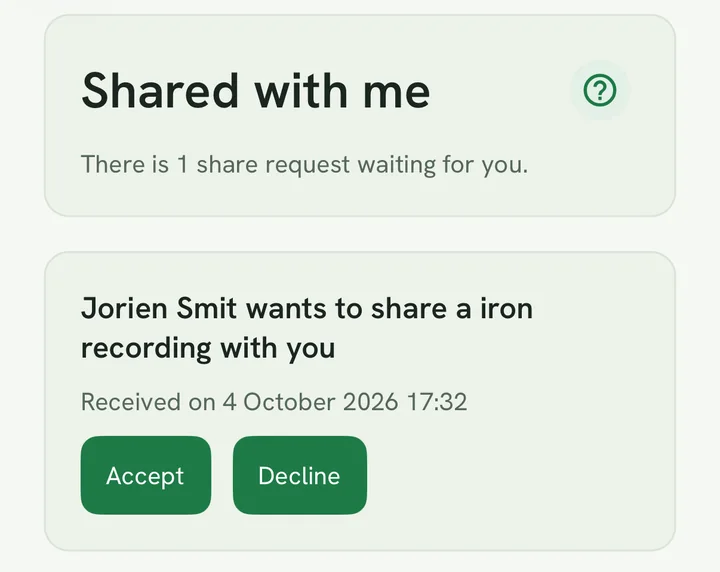
For each request you see
- who is sending it and which club the swing was hit with;
- when it arrived;
- the status: pending, accepted or declined.
If it says "recording no longer available", the sender has deleted the swing in the meantime.
Accepting
Tap Accept.
SwingIQ then makes a copy of the video of your own in your account in the background and analyses it like your own recordings: with your best shot for that club as the benchmark. That takes a moment. You get a notification as soon as the video is in your swings; it appears under your first golfer, with the "received" mark. After that it's yours — view it, move it to another golfer, delete it or share it on yourself.
A copy counts toward your storage. If your archive is full, accepting counts toward your storage explains what happens.
Declining
Tap Decline.
The request closes; the sender gets a notification that you declined. You can't undo a decline, but the sender is free to send the request again.
Good to know
- A request stays open for 30 days. After that it expires and disappears from your list.
- If the sender withdraws the request, it disappears too.
- Accepting and declining need a connection. Offline, you see the list as it was last time.
If someone wants to share a swing with you, you get a notification and an email. The swing doesn't show up in your swings right away: you decide first.
You'll find the requests in Swings under the Shared with me button. At the top it shows how many are waiting for you.
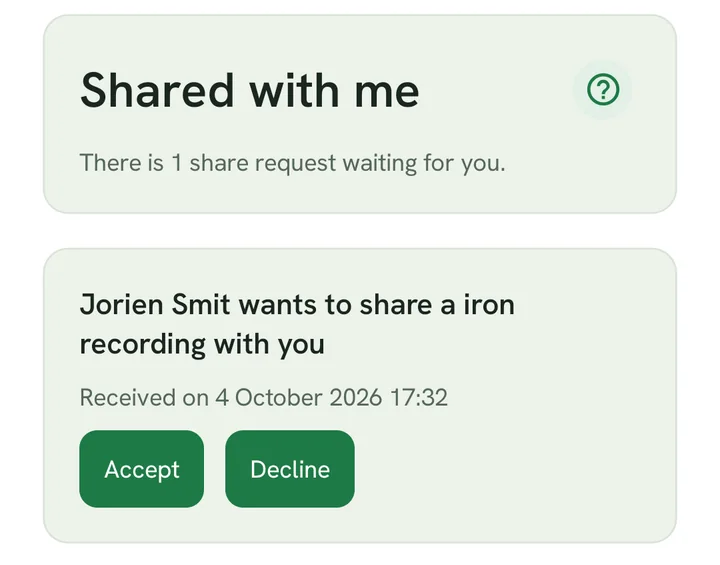
For each request you see
- who is sending it and which club the swing was hit with;
- when it arrived;
- the status: pending, accepted or declined.
If it says "recording no longer available", the sender has deleted the swing in the meantime.
Accepting
Tap Accept.
SwingIQ then makes a copy of the video of your own in your account in the background and analyses it like your own recordings: with your best shot for that club as the benchmark. That takes a moment. You get a notification as soon as the video is in your swings; it appears under your first golfer, with the "received" mark. After that it's yours — view it, move it to another golfer, delete it or share it on yourself.
A copy counts toward your storage. If your archive is full, accepting counts toward your storage explains what happens.
Declining
Tap Decline.
The request closes; the sender gets a notification that you declined. You can't undo a decline, but the sender is free to send the request again.
Good to know
- A request stays open for 30 days. After that it expires and disappears from your list.
- If the sender withdraws the request, it disappears too.
- Accepting and declining need a connection. Offline, you see the list as it was last time.
If someone wants to share a swing with you, you get a notification and an email. The swing doesn't show up in your swings right away: you decide first.
You'll find the requests at Shared, on the Received tab. The link in the email takes you straight to the request; log in first if you aren't already.
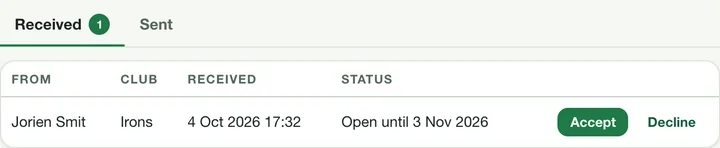
For each request you see
- who is sending it and which club the swing was hit with;
- when it arrived;
- the status: pending, accepted or declined.
If it says "recording no longer available", the sender has deleted the swing in the meantime.
Accepting
Click Accept.
SwingIQ then makes a copy of the video of your own in your account in the background and analyses it like your own recordings: with your best shot for that club as the benchmark. That takes a moment. You get a notification as soon as the video is in your swings; it appears under your first golfer, with the "received" mark. After that it's yours — view it, move it to another golfer, delete it or share it on yourself.
A copy counts toward your storage. If your archive is full, accepting counts toward your storage explains what happens.
Declining
Click Decline.
The request closes; the sender gets a notification that you declined. You can't undo a decline, but the sender is free to send the request again.
Good to know
- A request stays open for 30 days. After that it expires and disappears from your list.
- If the sender withdraws the request, it disappears too.
- Accepting and declining need a connection. Offline, you see the list as it was last time.